Projects / whatMLmodel
What is whatMLmodel?
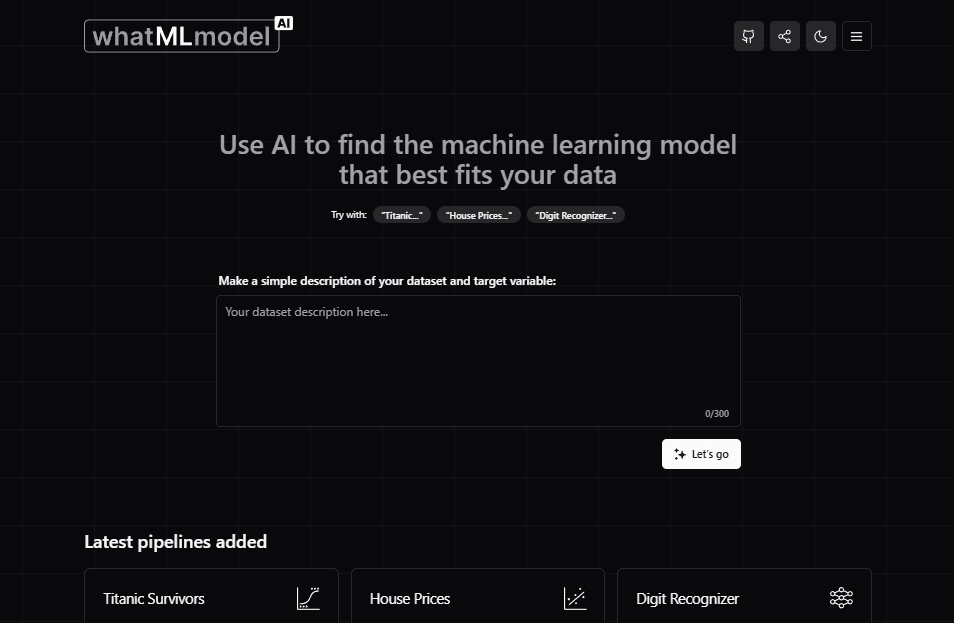
This is an AI–powered application that provides recommendations of machine learning models based on a brief description of a dataset. The project, which I am developing alongside collaborators, is still in its beta version and is open–source. If you are a developer or have knowledge of machine learning, you can join and contribute with your ideas and expertise.
How did the idea come about?
Back when generative text APIs were still finding their footing, a thought crossed my mind: what if, instead of prompting for free-form text, I asked for a structured JSON? The idea was to use the API not to power a chat, but to drive an application. I later found out this was already a thing — it just meant calling the API in “JSON mode”. All it took was a well-defined schema, a carefully crafted prompt, and an app that could respond to that structure.
Some time later, I delved into the world of machine learning and was surprised by the many factors to consider when choosing the correct model and handling a dataset properly. I used ChatGPT many times to get guidance on which model to apply to a given problem, but the chat interface wasn’t the most practical. I had to take several notes to consolidate my knowledge and make quick lookups easier.
Months later, while looking for inspiration for a new project, both ideas merged: I came up with the idea of creating a platform that would help develop model selection criteria for machine learning, with an accessible interface dynamically powered by AI. Additionally, since I was actively working through data processing problems for practice, I saw an opportunity to turn my solved cases into a knowledge base the AI could draw from to make its recommendations.
How the app works
The process is simple: the user starts by making a brief description of their dataset and target variable. A classic example would be: “Knowing the characteristics of the Titanic victims (age, sex, occupation, etc.), we seek to predict the probability of survival of a given person.”
From that description, the application generates a more detailed interpretation, which includes the name of the most important features, the size of the dataset, etc. The user must check this information and correct it before clicking Get models.
Then, the AI generates a series of recommendations having detected the type of problem (regression, classification or clustering) and suggesting adaptations to other types if possible. For example, the probability of survival can be determined by a discrete variable (yes or no) and we would be talking about a classification problem, but it can be translated to a regression problem if it is defined by a continuous variable (a 70% probability of survival).
The result is an interactive analysis in which the user can explore the most suitable machine learning models for their problem and see how they have performed on similar datasets, being able to explore the code used in them. The objective is that the person can apply their own criteria to decide which model is convenient to use, considering options that they may not have taken into account.
A side menu lets you revisit any past analysis, bookmark favorites, and make edits. I intentionally kept things simple by skipping account creation — all data is stored locally in the browser.
Prompt engineering
The application interacts with AI on two occasions. Initially, with the user's initial description, the AI generates a more detailed interpretation. This is the prompt used in that case:
Next, the user corrects the information, leading to a second call to the AI, which generates model recommendations based on the following prompt:
Additionally, response prototypes and lists of similar datasets that should be selected are provided. This ensures that the AI has enough context to deliver an effective response. The response is then processed by the backend, which recognizes the JSON keys to structure a sequence of paragraphs and tables.
Upcoming Features
We have a series of features in mind that expand the project’s vision while enriching both learning and collaboration:
- Encyclopedia: A dedicated component for exploring the definitions, foundations, and application contexts behind each model, supported by visual explanations and the theoretical framework behind performance metrics.
- Complete Pipelines: The application currently includes illustrative pipelines designed to showcase general workflows. The next step focuses on building a library of real treatments and applied case studies, open to community contributions and oriented toward hands-on learning.
- Pipeline Branching: The ability to visualize different strategies for approaching the same problem from multiple perspectives. Through an approach selector, users will be able to explore regression, classification, or clustering alternatives while comparing possible paths and outcomes.
- Interactive Chat: Each analysis will have its own conversational space to continue exploring the problem, refine hypotheses, interpret results, and discuss possible solution strategies.
- Code Generation: Assisted implementation generation will help translate suggested models into usable code. This is a particularly challenging feature —due to hallucination risks and the technical judgment required to interpret outputs—, but also one of the areas with the greatest potential to transform the project into a practical tool for learning and development.
- Collaborative Community: A space centered around sharing datasets, experiences, and solutions, where users can collaborate, learn from one another, and build applied knowledge around real-world problems.
Once again: this is an open–source project
We want this application to become the best platform for learning about machine learning and exploring different models. So, if you like the idea and you're a developer or have knowledge of machine learning, you're more than welcome to contribute!